Phantom WiFi Interference: A Troubleshooting Deep Dive
Tracking down non-compliant RF interference using SDR analysis when standard WiFi monitoring tools failed. The culprit: Realtek 8822CE chips emitting noise in sleep states.
Phantom WiFi Interference: A Troubleshooting Deep Dive
A client contacted us about intermittent WiFi performance degradation that their IT team couldn't isolate. The interference appeared randomly across different channels, moved between physical locations, and wasn't visible to standard 802.11 monitoring tools. This required moving beyond protocol-level analysis to raw RF spectrum investigation.
Problem Profile: Non-Compliant Interference
Multiple access points reported significant channel utilization despite minimal legitimate client traffic. The interference pattern showed several problematic characteristics:
- Channel hopping behavior: Appeared on different channels unpredictably
- Spatial mobility: Moved between facility zones
- Non-802.11 compliance: Not recognized by WiFi analyzers as valid traffic
- Intermittent presence: Disappeared and reappeared without pattern
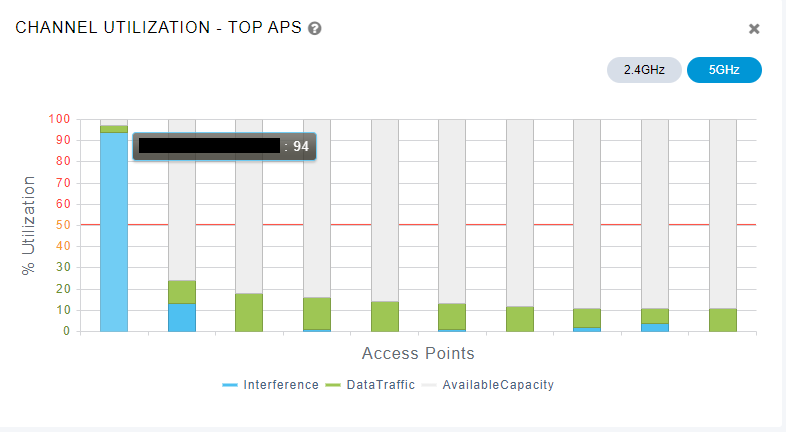
Standard wireless monitoring systems detected the presence of RF energy but couldn't decode it. The traffic wasn't registering with valid 802.11 frame headers—just raw noise occupying spectrum.
SDR Analysis: HackRF One Deployment
When WiFi monitoring tools can't decode the interference, you need visibility into the raw RF spectrum. We deployed a HackRF One with Looking Glass spectrum analyzer to capture all RF activity regardless of protocol compliance.
The Investigation Challenge
The interference required a reactive approach:
- Monitor reports from wireless controllers for channel utilization spikes
- Wait for interference event to begin on specific channels
- Navigate to affected area while interference was active
- Tune SDR to active interference channels and perform directional analysis
This reactive hunting methodology was necessary because the interference appeared unpredictably. Standard "walk the facility" RF surveys don't work when the signal isn't constant.
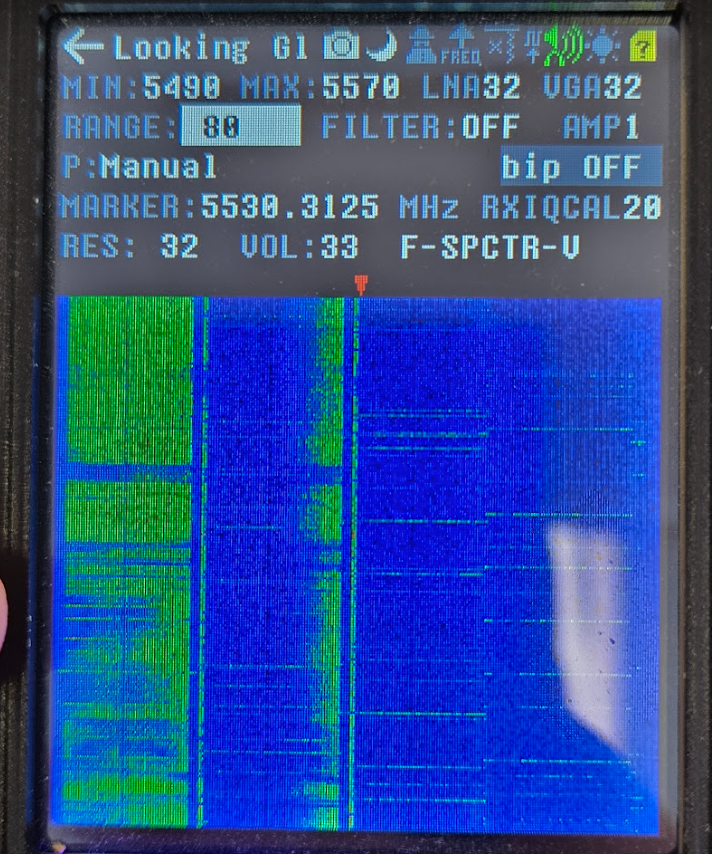
Spectrum Analysis: Clean vs. Contaminated
Here's what healthy 802.11ac traffic looks like on an 80MHz channel:
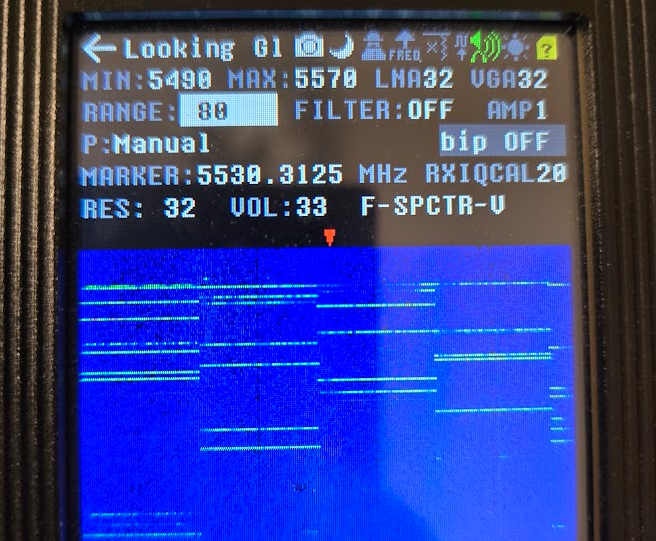
Clean spectrum characteristics:
- Discrete transmission bursts across full 80MHz channel width
- Clean channel edges with proper spectral mask
- Short-duration packets (typical 802.11 PPDU timing)
- No background noise floor elevation between frames
- Clear quiet periods showing proper CSMA/CA behavior
The interference pattern showed none of these characteristics—continuous noise floor elevation with irregular spectral density.
Directional RF Hunting
Using signal strength as our indicator, we performed systematic RF direction finding. Move toward the source, RSSI increases. Move away, it decreases. After multiple iterations across affected zones, we identified strong correlation with specific workstations.
Key observation: Interference ceased immediately when we approached active sources. The physical approach triggered some state change in the interfering device.
Root Cause: Device State Correlation
Testing the hypothesis that user interaction affected interference, we isolated laptops near interference hotspots. All were closed with users away from desks. Opening the lid immediately stopped the interference.
Commonalities across all interfering devices:
- Realtek RTL8822CE WiFi adapter (extremely common OEM chipset)
- Sleep state with lid closed (not hibernate, not powered off)
- Active interference only during sleep state
Technical Analysis: Channel Behavior
The channel-hopping pattern now made sense. Each laptop generated interference on the channel it was associated with when entering sleep state.
- Device connects to AP on Channel 36 (5180MHz, 80MHz wide)
- User closes lid → enters sleep state
- WiFi chip enters power-save mode but maintains frequency lock
- Generates non-compliant RF noise on Channel 36
- Interference persists until device wakes or powers down
This explained why interference appeared on different channels—the laptops were distributed across multiple APs operating on different channels. As users moved throughout the day and connected to different APs before closing their laptops, the interference followed their last-associated channel.
Power Management State Analysis
The Realtek 8822CE in sleep state attempts to maintain wake-on-wireless-LAN (WoWLAN) functionality. The chip remains partially powered to listen for magic packets and maintain minimal state. During this low-power mode with specific driver versions and firmware combinations, the RF frontend can emit irregular signals that violate 802.11 spectral mask requirements.
Why waking stops interference:
- Full power restoration reinitialized RF circuits
- Driver reloads proper frequency synthesis parameters
- Normal 802.11 compliance resumes
Solution: Power Management Remediation
Rather than attempting per-device driver updates or firmware patches across multiple OEM models, we deployed a centralized fix via Group Policy: configure lid-close action to hibernate.
Sleep vs. Hibernate:
- Sleep (S3 state): WiFi chip remains powered in low-power mode → interference continues
- Hibernate (S4 state): Complete power-down, memory written to disk → WiFi chip fully powered off → no RF emission
Policy deployment was immediate via Active Directory. Affected devices picked up the policy change on next check-in. Interference ceased network-wide within 24 hours as users closed lids and devices entered hibernate instead of sleep.
Performance impact: Negligible. Modern NVMe SSDs resume from hibernate in 10-15 seconds, acceptable for the use case.
Technical Takeaways
SDR Tools for Non-Protocol Analysis
When interference doesn't decode as valid 802.11 traffic, protocol analyzers are useless. You need raw RF visibility. The HackRF One at $300 provides spectrum analysis capabilities that would otherwise require $10,000+ dedicated spectrum analyzers.
Channel Persistence in Sleep States
Power-save implementations can maintain frequency synthesis state to reduce wake latency. This creates edge cases where malfunctioning chips continue emitting on their last-used channel. Understanding this behavior is critical for diagnosing channel-specific intermittent interference.
Reactive Troubleshooting Methodology
Intermittent interference requires reactive investigation:
- Monitor wireless controller logs for utilization spikes
- Identify affected channels in real-time
- Deploy to location while interference active
- Capture with SDR tuned to specific channels
- Perform directional analysis before interference disappears
Standard predictive or scheduled RF surveys won't catch intermittent issues.
Tools and Equipment
- HackRF One: Software-defined radio (0-6GHz spectrum analysis)
- Looking Glass: Real-time FFT spectrum analyzer frontend
- Wireless controller logging: Channel utilization monitoring
- Active Directory Group Policy: Centralized power management deployment
Experiencing unexplained WiFi interference or performance issues? Our team specializes in advanced RF troubleshooting using SDR and protocol analysis tools. Contact us for expert wireless infrastructure diagnostics.